For jiu-jitsu academies
Run the gym. Let the billing run itself.
Gymisphere keeps your memberships, dues, check-ins and paperwork in one place — so the front desk stops chasing payments and hunting for signed waivers.
30 days free. A card is required to start, and nothing is charged until the trial ends. Cancel any time.
Dues collect themselves
Cards on file renew on schedule through Stripe or Square. Failed payments are flagged, not lost.
Waivers signed on a phone
Send a link, get a signature. The document and the signature stay together.
Belts, stripes and families
Promotions with history, family accounts with one payer, and a portal for members.
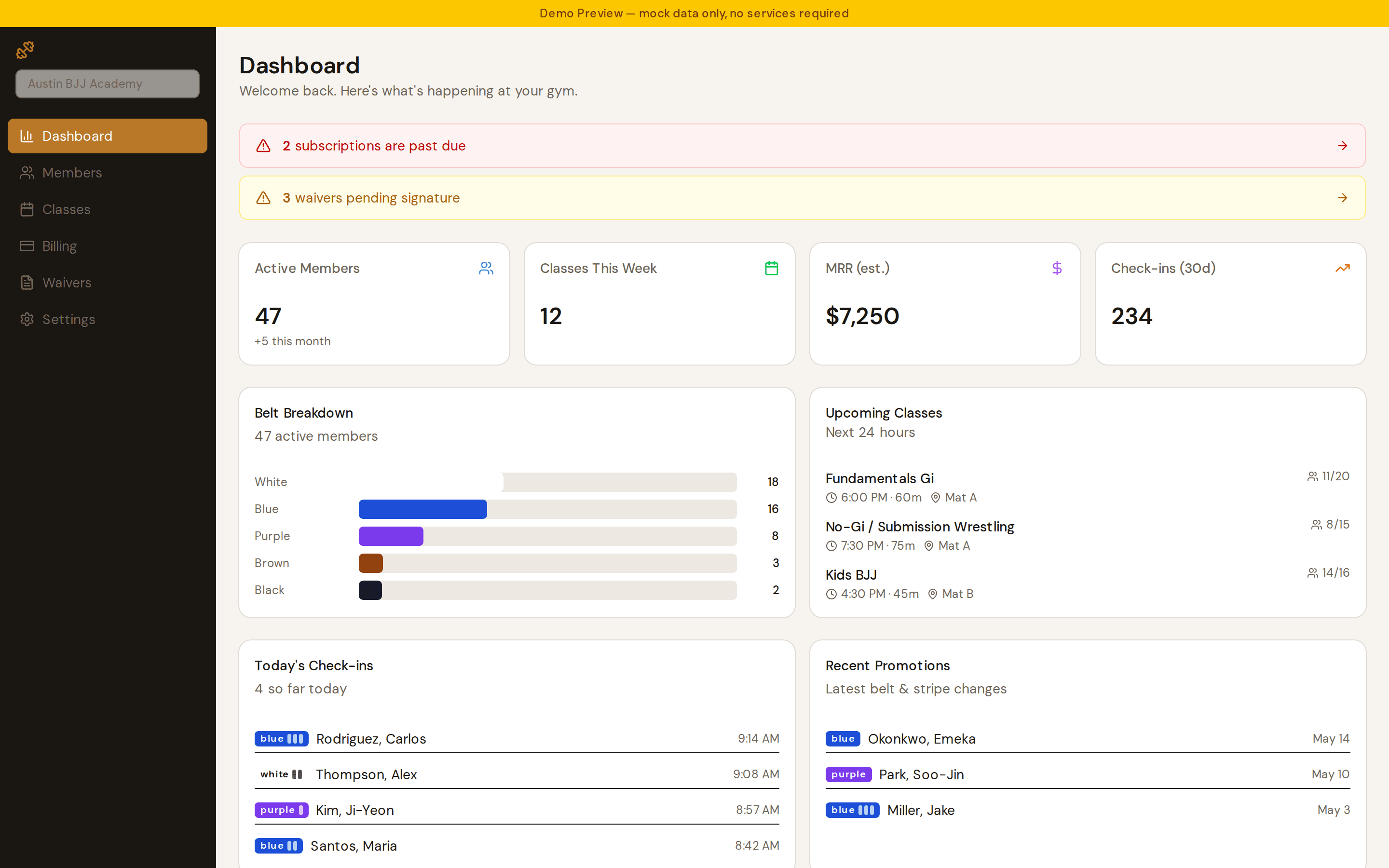
Numbers you can act on
Revenue, attendance and who's past due — without exporting anything.
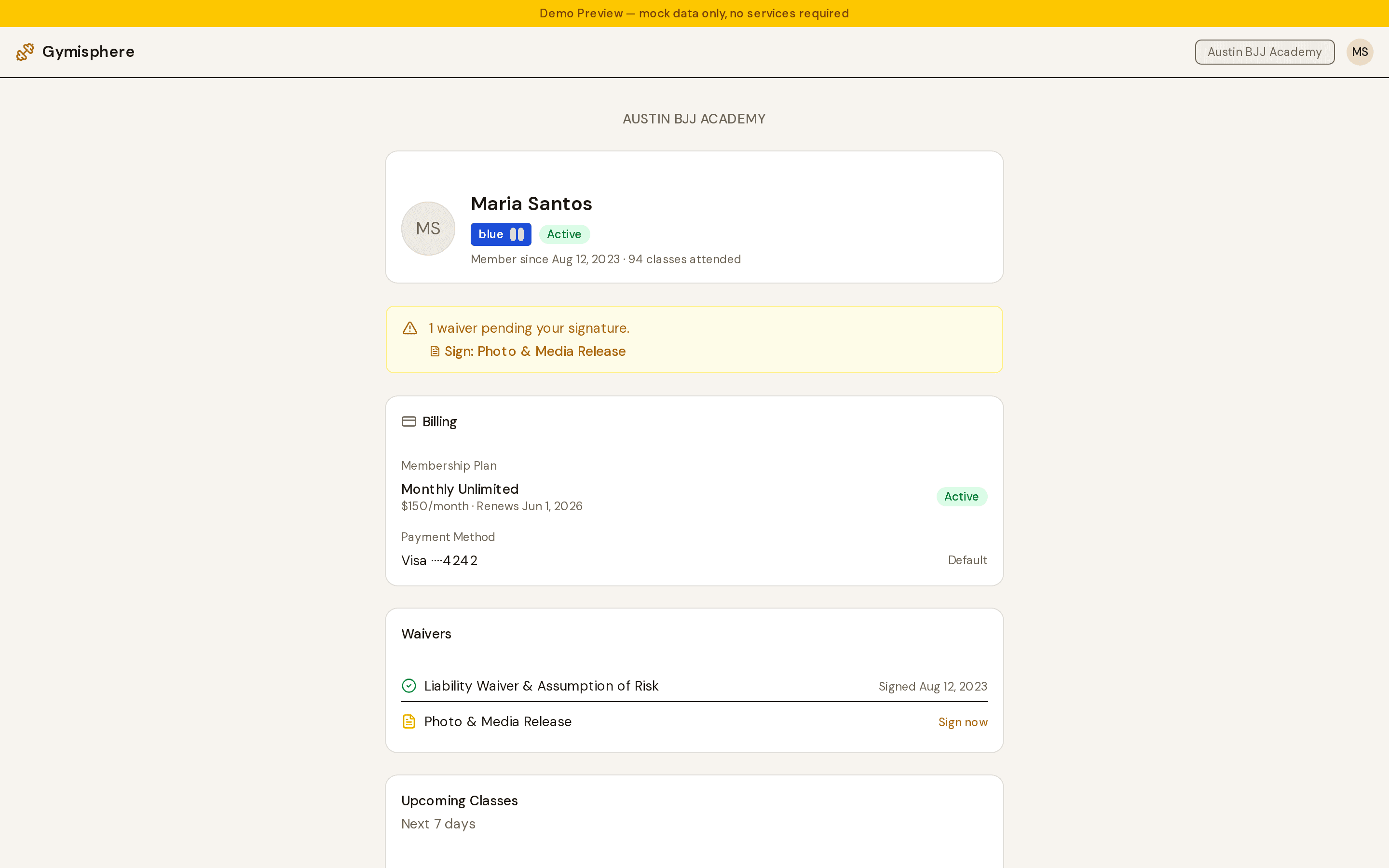
Members get their own page
One link, no app to install and no password: their membership, the card on file, anything still to sign, and what's on the schedule this week.
It's also where they fix an expired card, which saves the front desk the conversation.
The month shouldn't start with a spreadsheet
Most academies run on a payment app, a paper waiver folder and somebody's memory of who paid. It works until it doesn't: a member trains for three months on a card that expired in January, and nobody notices until you go looking.
Gymisphere keeps the card on file, charges it on schedule, tells you the moment one fails, and keeps every waiver and agreement attached to the member who signed it.
- Memberships that renew without anyone remembering
- Past-due members surfaced the day it happens
- Waivers and agreements signed before the first class
- Attendance from a kiosk the front desk leaves open
- One place to answer "did they pay?"
Everything the front desk touches
Every plan includes all of it.
Dues that collect themselves
Members' cards stay on file and renew on schedule. Take payments through Gymisphere, your own Stripe account, or Square.
- Recurring monthly, quarterly or annual memberships
- Cards on file, charged automatically on renewal
- Failed payments flagged as past due, with the member notified
Every member, belt and stripe
Profiles, ranks, promotions and family accounts, with the history behind each one.
- Belt and stripe tracking with promotion history
- Configurable rank systems, adult and kids
- Family accounts with a single payer
Classes and check-in
A schedule your coaches can run, and a kiosk the front desk can leave open.
- Recurring class schedules by type
- Tap-to-check-in kiosk screen
- Attendance history per member and per class
Waivers and contracts, signed
Send a link, get a signature, keep the record. No printer, no filing cabinet.
- Liability waivers signed on a phone
- Membership agreements with your own terms
- Signature, date and IP stored with the document
Sell gis, rash guards and drop-ins
A register at the front desk that charges the card already on file.
- Products with stock levels and low-stock warnings
- Charge a member's card on file, cash, or another method
- Tax applied from your own rate
Know where the gym stands
Revenue, attendance, growth and retention, without exporting anything.
- Monthly revenue and recurring revenue
- Attendance trends and check-in counts
- New members by month and belt distribution
Priced by how many members you have
Every plan includes every feature. The only difference is how many active members you have.
Micro Gym
$50/mo
Up to 50 active members
Small Gym
$75/mo
Up to 100 active members
Medium Gym
$125/mo
Up to 200 active members
Large Gym
$175/mo
Up to 400 active members
Gymisphere adds 1% to each member payment, on top of your processor's own fees.
Questions gym owners ask
Can I keep my existing Stripe account?+
Yes. Connect the Stripe account you already use and the cards your members have saved keep working, with payouts going where they go today. If you'd rather not deal with Stripe at all, Gymisphere Payments sets an account up for you inside the app. Square works too.
What does it cost in total?+
Your monthly plan, plus 1% of each member payment, plus whatever your processor charges (Stripe and Square are both about 2.9% + 30¢ for online card payments). Nothing else: every feature is in every plan.
How do I move my members over?+
Import your roster from a CSV — names, emails, belts and membership dates. Members' saved cards live with your payment processor, so connecting the Stripe account you already use keeps them intact. Otherwise members add a card once through a link you send.
What happens when a payment fails?+
The membership is marked past due and the member is told their payment failed. Your processor retries on its own schedule, and the membership returns to active as soon as one succeeds. Nothing is cancelled behind your back.
Can members sign waivers on their phone?+
Yes. You send a link and they sign on any device — no login, no app to install. The signature, date and document are stored together, and outstanding paperwork shows on the member's profile.
Is there a contract or setup fee?+
No. Monthly, cancel whenever, no setup fee. The 30-day trial needs a card so your gym rolls straight onto its plan if you stay.
Does it work for a gym that isn't jiu-jitsu?+
The belt and stripe tracking is built for BJJ, and the rank system is configurable, so any martial art with a ranking ladder fits. Gyms without ranks can turn it off and use the rest.
Try it with your real roster
Import your members, connect payments, and see next month's dues collect on their own.